ai
Why Knowledge Search Fails Inside Existing Tools — And What Actually Works
Why Knowledge Search Fails Inside Existing Tools — And What Actually Works
Your team knows the answer exists somewhere. It’s in Confluence. Or Salesforce. Maybe both. Probably in Slack threads too.
So they search. They refine. They ask a colleague. They search again.
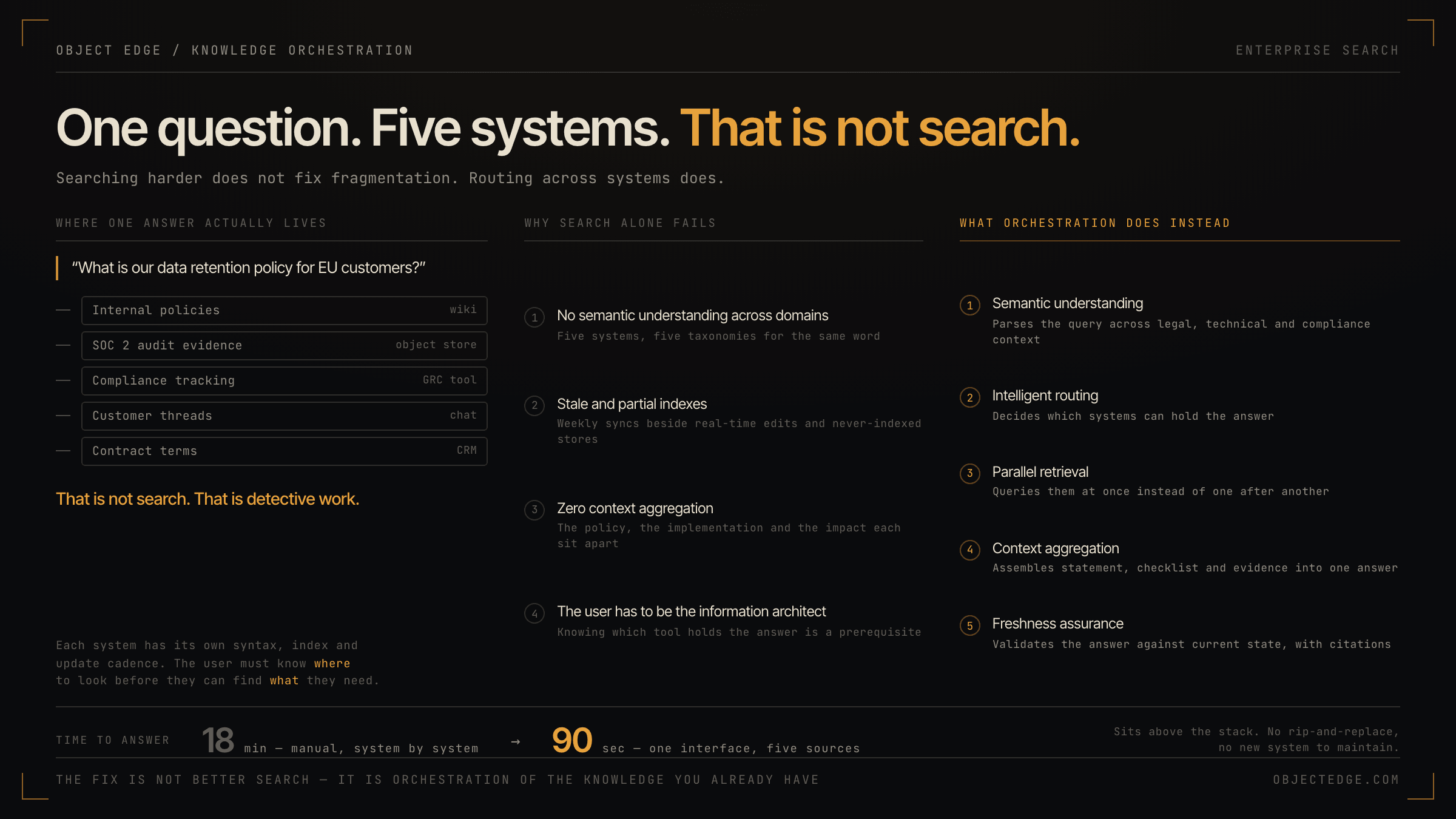
Average time-to-answer inside existing tools: 18 minutes. For a question that should take 90 seconds.
This isn’t a search problem. It’s an orchestration problem.
The Real Cost of Fragmented Knowledge
Most enterprises run 5–7 knowledge systems in parallel. Each has its own search syntax, indexing logic, and update cadence. Each requires a user to know where to look before they can what to find.
When your CTO asks a vendor security question:
- It lives in your internal policies (Confluence)
- It’s documented in your SOC 2 audit (S3 bucket)
- It’s tracked in your compliance tool (Workiva)
- It’s discussed in customer Slack threads (Slack)
- It’s partially answered in your wiki (Notion)
Without orchestration, the user has to manually query each system. That’s not search. That’s detective work.
The math is brutal:
- 23% of enterprise employees spend 1+ hours daily searching for information they need to do their job
- 40% of knowledge worker time is spent looking for information instead of acting on it
- That’s roughly $11K lost productivity per employee annually
And that’s before you factor in decision latency, missed context, and the compounding cost of wrong answers found in the wrong system.
Why Traditional Search Tools Fail at Scale
Search vendors built their products for a single source of truth. Google works because the entire public web is what it is. Elasticsearch works because you control the data going in. Confluence search works if Confluence is your only system.
Enterprise reality is different.
Problem 1: No semantic understanding across domains. A “policy” in your legal system isn’t indexed the same way as a “policy” in your governance tool. A user asking about “customer data retention” gets results from five systems using five different taxonomies. Most results are noise.
Problem 2: Stale, incomplete indexes. Your Salesforce syncs to your data warehouse weekly. Your Confluence updates in real time. Your S3 policies never auto-index. You’re always searching against a partially outdated snapshot of your actual knowledge.
Problem 3: Zero context aggregation. When you find an answer in one system, it often depends on context in another. You need the policy from Confluence plus the implementation from your codebase plus the customer impact from your CRM. Search tools make you assemble this manually.
Problem 4: User has to know the system. Your CFO shouldn’t need to remember that “vendor agreements live in Coupa, not Salesforce.” Your engineer shouldn’t need to know whether deployment runbooks are in Confluence or in your internal wiki. The user shouldn’t have to be an information architect.
This is why knowledge workers treat search as a last resort and default to asking colleagues instead. It’s faster and more reliable — even though it doesn’t scale.
The Orchestration Solution: Answer in Under 2 Minutes
Orchestration means one interface, multiple sources, intelligent routing.
Here’s what it looks like in practice:
User query: “What’s our data retention policy for EU customers?”
Orchestration layer does:
- Semantic understanding — parses the query across legal, technical, and compliance contexts
- Intelligent routing — knows which systems to query (compliance tool, legal wiki, customer contracts database)
- Parallel retrieval — hits all systems simultaneously instead of sequential search
- Context aggregation — combines the policy statement, the implementation checklist, and the audit evidence into one coherent answer
- Freshness assurance — validates that the answer reflects the current state across all systems
Result: Answer in 90 seconds instead of 18 minutes. With full context. Across five systems. Without the user knowing they were queried.
Real deployment metrics show:
- 73% reduction in time-to-answer vs. multi-system manual search
- 82% fewer follow-up questions (context is complete)
- 94% higher adoption when users experience the speed difference once
Why This Matters for Technical Leadership
Your team’s constraints are real:
- You can’t afford to replace all your tools (Confluence, Salesforce, Slack, etc. work fine individually)
- You can’t force everyone into a single system (too much friction, too expensive, too slow)
- You can’t hire someone whose only job is to be an information broker
Orchestration is the pragmatic middle ground. It doesn’t replace your existing stack. It sits above it. It lets your systems stay as they are while dramatically improving how humans interact with all of them together.
For CTOs: this is an infrastructure problem, not a software problem. You’re adding an intelligent routing layer.
For VPs of Operations: this solves a quantifiable productivity leak without forcing operational change.
For VPs of Engineering: your teams stop context-switching between systems and get back to building.
The Risk of Waiting
Every quarter you delay is another quarter of compound lost productivity. It’s not $11K per employee per year — it’s compounding friction in critical decisions.
A deal-review cycle that takes 6 hours instead of 2 because legal can’t find the contract fast enough. A security incident investigation that takes 18 hours because the runbook was in the wrong system. An engineering decision delayed because context is scattered across Slack, Confluence, and GitHub.
These aren’t rare edge cases. They’re every week for technical organizations past a certain scale.
What to Do Next
If this resonates, ask yourself:
- How many minutes per week do your teams spend searching for information across multiple systems?
- How many decisions get delayed because context isn’t aggregated?
- What’s the actual cost of information fragmentation in your organization?
Start there. The math usually speaks for itself.
Then look for solutions that:
- Work with your existing tools (no rip-and-replace)
- Reduce time-to-answer (measure it)
- Aggregate context (don’t just search harder)
- Scale with your organization (work as you grow, not against it)
The future of knowledge work isn’t better search. It’s intelligent orchestration of the knowledge you already have.
Ready to reduce your time-to-answer by 70%? [Schedule a 20-minute demo] to see orchestration in action with your actual tools and data.
Object Edge helps technical organizations reclaim productivity by orchestrating knowledge across their entire tool stack. No rip-and-replace. No new systems to maintain. Just faster answers.
Related articles
-
ai
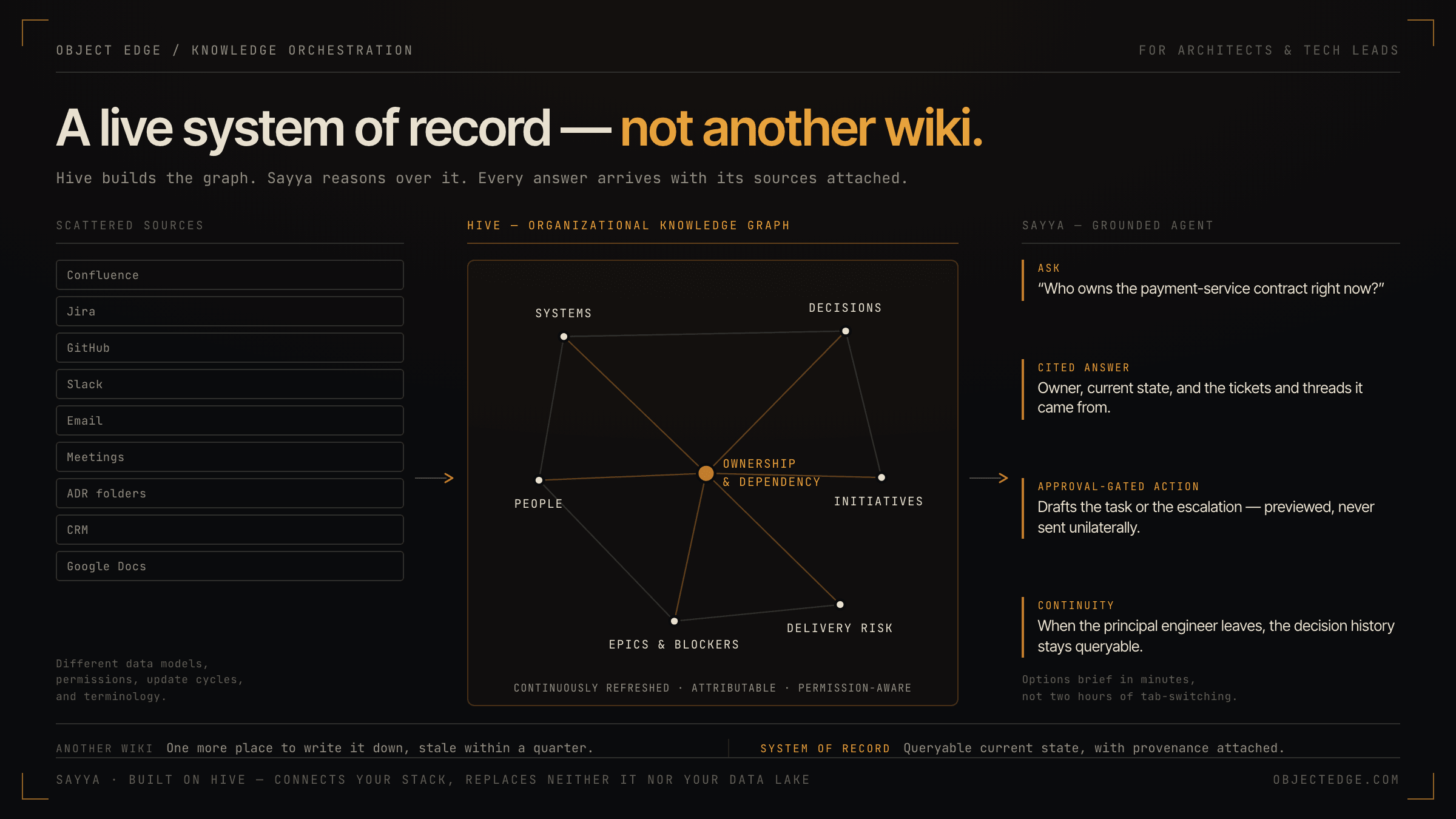
How Hive and Sayya give architects and tech leads a live system of record—not another wiki
Hive builds a continuously refreshed organizational knowledge graph; Sayya is the grounded agent that queries it. Together they give solution architects and tech leads the decision context, dependency visibility, and controlled AI actions that scattered docs and tribal knowledge never could.
-
ai
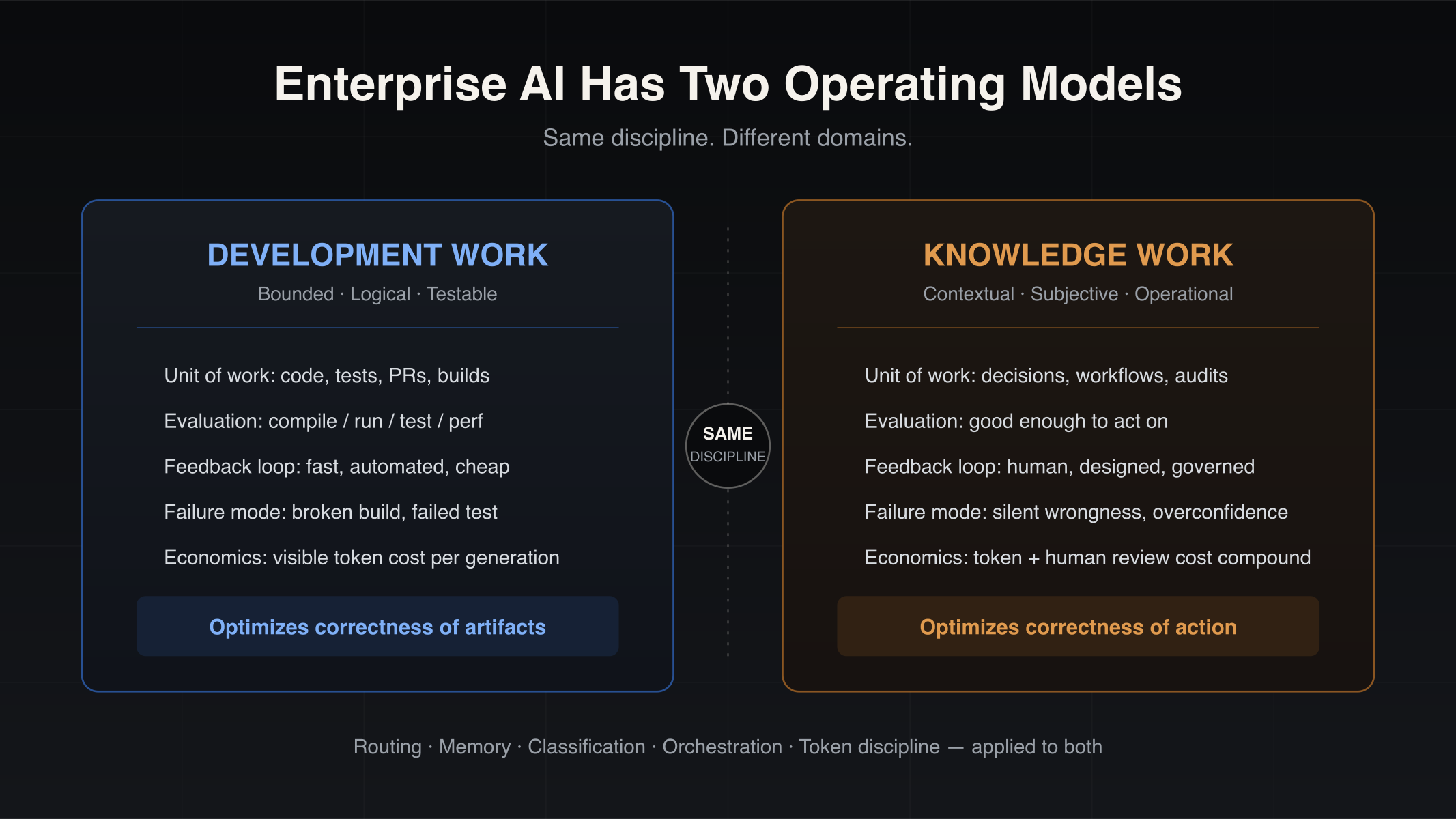
Enterprise AI Has Two Operating Models: Development Work and Knowledge Work
Enterprise AI is splitting into two operating models — development work and knowledge work. Why coding-copilot playbooks stall on operational workflows, and which engineering disciplines transfer.
-
ai
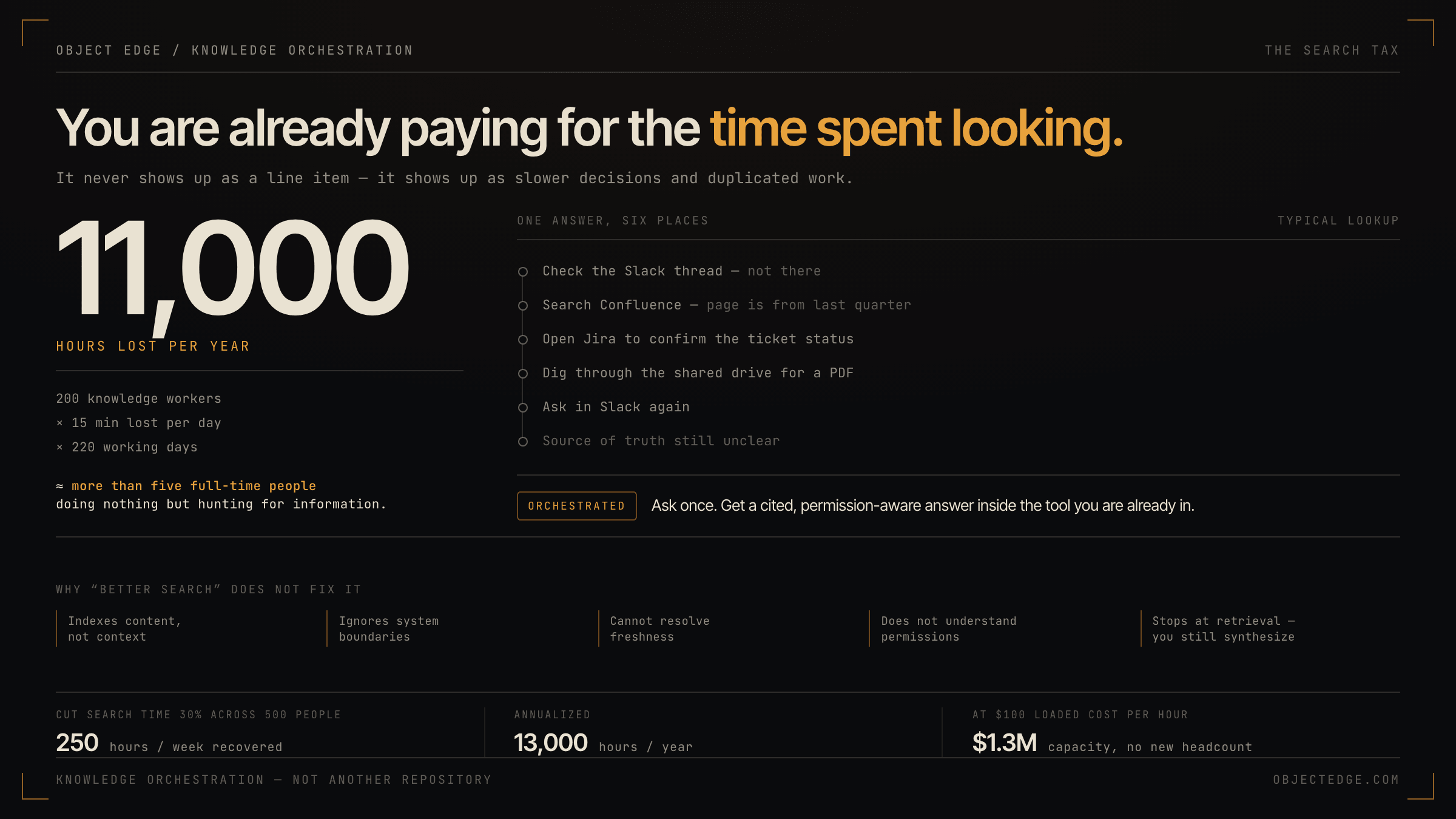
Stop Losing Hours to Search: How Knowledge Orchestration Cuts Time Wasted Across Systems
Why teams burn hours hunting for answers across tools, and how knowledge orchestration reduces that friction for engineering and operations leaders.